Campaign Details Panel
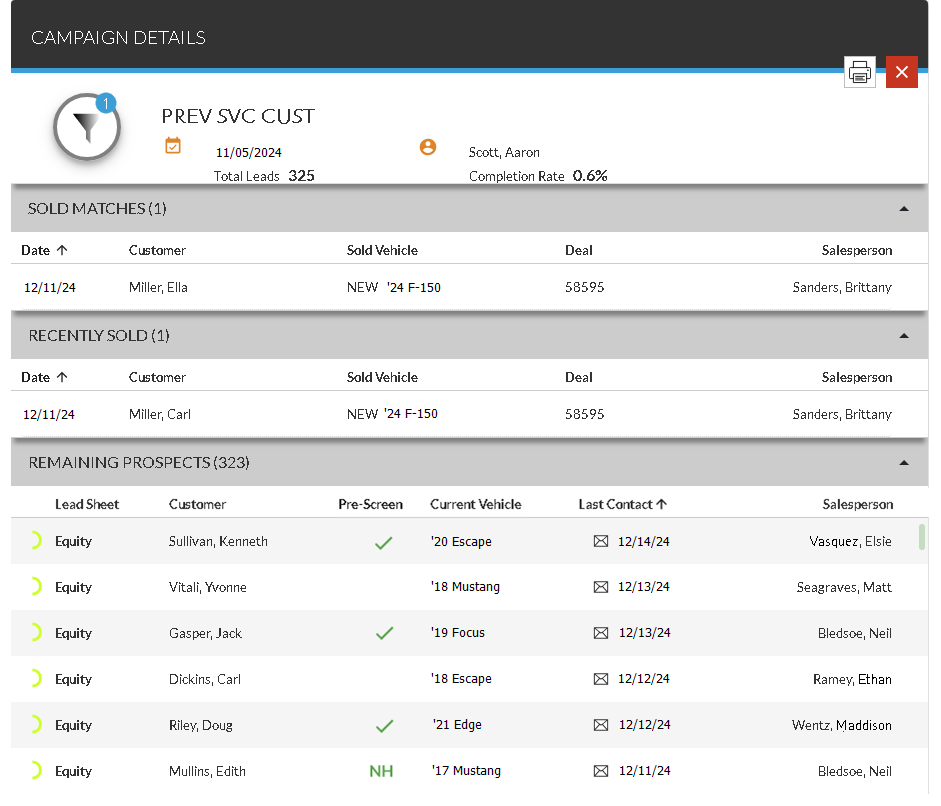
The Campaign Details panel is used to review information for the selected sales campaign, such as the number of vehicles sold as a result of the campaign. Information for leads included in the campaign that have not resulted in vehicle sales also display on this panel.

|
The Campaign Details panel can be accessed using one of the following methods.
|
To print the lead sheets for the leads displayed on this panel, click the  (Print) icon. The PRINT button displays in place of the (Print) icon, and check boxes display in each row in the section. Select the check box corresponding to each lead sheet to print, and click the PRINT button. The lead sheets for the selected leads display on a separate browser tab, where they can be reviewed and printed.
 General Information Section
The unlabeled General Information section is used to review basic information about the selected sales campaign.
The following items display in the General Information section.
Title: (Not labeled) The name of the campaign displays.
 (Date Added): The date that the campaign was created displays.
 (Added By): The user who created the campaign displays.
Total Leads: The total number of leads included on the campaign displays.
Completion Rate: The percentage of leads generated by the sales campaign that resulted in vehicle sales displays.
Sold Matches Section
The Sold Matches section is used to review information for vehicle deals that have been completed as a result of the selected sales campaign. Information in this section is automatically sorted based on the Date column, but can be changed.
Click any column heading that displays in bold text to sort the completed deals. The deals in the results are re-sorted by the selected column in ascending order, and the  (Ascending) icon displays next to the selected column heading.
To change the sort to descending order, click the same column heading again. The deals are re-sorted in descending order, and the  (Descending) icon displays next to the selected column.
The following columns display in the Sold Matches section.
Date: The date the vehicle was sold displays.
Customer: The customer's name displays. In addition, * (Asterisk) displays to the right of the customer's name if the lead sheet has been printed.
Sold Vehicle: The type, year, and model of the vehicle sold display.
Deal: The deal number displays.
Salesperson: The name of the primary salesperson on the deal displays.
Recently Sold Section
The Recently Sold section is used to review information for vehicles that were sold recently but are not credited to the selected sales campaign. Information in this section is automatically sorted based on the Date column, but can be changed.
Click any column heading that displays in bold text to sort the arrived customers. The customers in the results are re-sorted by the selected column in ascending order, and the (Ascending) icon displays next to the selected column heading.
To change the sort to descending order, click the same column heading again. The customers are re-sorted in descending order, and the (Descending) icon displays next to the selected column.
The following columns display in the Recently Sold section.
Date: The date the vehicle was sold displays.
Customer: The name of the customer on the deal displays.
Sold Vehicle: The type, year, and model of the vehicle sold display.
Deal: The deal number displays.
Salesperson: The name of the primary salesperson on the deal displays.
Remaining Prospects Section
The Remaining Prospects section is used to review information for prospects that have been included in the campaign that have not yet resulted in a vehicle sale. Information in this section is automatically sorted based on the Current Vehicle column, but can be changed.
Click any column heading that displays in bold text to sort the prospects. The prospects in the results are re-sorted by the selected column in ascending order, and the (Ascending) icon displays next to the selected column heading.
To change the sort to descending order, click the same column heading again. The customers are re-sorted in descending order, and the (Descending) icon displays next to the selected column.
To view additional information on the prospects in this section, click a prospect row. The Lead Sheet panel displays where additional information, such as the customer's service history and contact information can be viewed and printed.
The following columns display in the Remaining Prospects section.
Prediction Indicator: (Not labeled) An icon displays to indicate how likely the corresponding customer is to purchase a vehicle.
The following icons can display.
-
 (Okay)
 -
 (Good)
 -
 (Great)
 -
 (Wow)
(Wow)
Lead Sheet: The type of lead sheet suggested for the customer displays.
The following lead sheet types are available.
-
Cash Non-Stock. This lead sheet is used when proposing cash deals that do not include vehicles currently in stock.
-
Cash Stock. This lead sheet is used when proposing cash deals that include vehicles currently in stock.
-
Equity. This lead sheet is used for a customer for whom finance information is available, but there is no proposed vehicle. This lead sheet is used to inform the customer of the estimated equity of his vehicle.
-
Market Value. This lead sheet is used for a customer for whom no previous deal information is available. This lead sheet is used to inform the customer of the market value of his current vehicle.
-
Lease Non-Stock. This lead sheet is used when proposing lease deals that do not include vehicles currently in stock.
-
Lease Stock. This lead sheet is used when proposing lease deals that include a vehicle currently in stock.
-
Retail Non-Stock. This lead sheet is used when proposing finance deals that do not include vehicles currently in stock.
-
Retail Stock. This lead sheet is used when proposing finance deals that include vehicles currently in stock.
Customer: The customer's name displays. In addition, * (Asterisk) displays to the right of the customer's name if the lead sheet has been printed.
Pre-Screen: An icon indicating the credit worthiness of the prospect displays.
The following icons can display:
-
 (Approved). The prospect was pre-approved for financing.
 -
 (No Hit). Credit information could not be found for the corresponding name and address.
 -
 (No Offer). The prospect was denied for financing.
 -
 (Not Applicable). A pre-screen request cannot be sent for various reasons, such as if the prospect is a business. Hover the mouse cursor over this icon to display a tooltip indicating the reason the request cannot be sent.
 -
 (Pending). The pre-screen request is still processing.
Note - Pre-screen results are only available if FOCUS or the Customer application
Current Vehicle: The model year and model of the customer's current vehicle display.
Last Contact: An icon displays to indicate the method used to last contact the customer. Click an icon to display the View Communication panel, where the template used to send the letter or Email message can be reviewed. In addition, the date the customer was last contacted also displays in this column.
The following icons can display.
-
 (Direct Mail)
 -
 (Email Message)
Salesperson: The salesperson originally associated with the customer displays.
Worked By: The name of the user who reviewed the lead and performed necessary actions displays. Leads are marked as worked by clicking the  (Unworked) icon on the Lead Sheet panel. When the (Unworked) icon is clicked, the icon toggles to the
  (Worked) icon to indicate the lead was worked.
Note - Marking leads as worked is only available if FOCUS or the Customer application
Click here for a list of products that may be mentioned in this help file.